Use Free Water Eject Tool
A steady tone around 165 Hz for the main speaker at the bottom edge — the one most people need after a splash, rain or a wet counter.
Tip: unplug the charger, take the case off, turn the media volume to maximum and hold the phone with the wet speaker facing down.
Water Eject – Remove Water from Your Phone Speaker Online
A few drops on the speaker, and suddenly your phone sounds like it’s talking from the bottom of a pool. I know that feeling. A rainy walk, a wet bathroom counter, one splash at the beach, and your music turns quiet and muffled. The first time it happened to me, I shook the phone, blew into the speaker, and honestly panicked a little. What finally worked was the water eject method on this page: a low tone that shakes the droplets out of the speaker grille.
This guide shows you how the tool works, how to use it on iPhone and Android, what to avoid, and when to stop trying and visit a repair shop. You also get the honest part, including what a tone can never fix.
Water Eject Tool
Press the button on this page and the tool plays a low-frequency tone for 60 seconds. It runs in Safari, Chrome, Edge, or Firefox. There is no app to install and no sign-up. Pick a mode, turn the volume up, and let it run.
How to Use the Water Eject Tool?
The whole thing takes about a minute. Before you start, unplug the charger and take the phone out of its case.
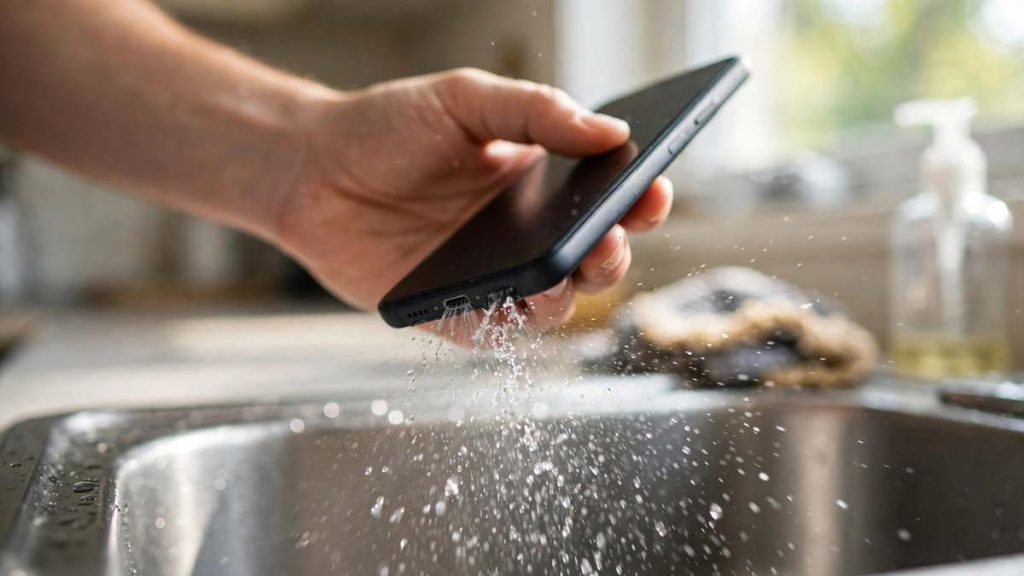
- Turn Your Phone Volume Up. Raise the media volume to maximum. On iPhone, switch Silent mode off and disconnect Bluetooth earbuds. Otherwise the tone plays somewhere else and you think nothing happened. I made that mistake once and wasted ten minutes.
- Point the Speaker Downward. Hold the phone so the wet speaker faces the floor. Gravity helps the droplets fall out instead of sliding back in.
- Play the Water Eject Sound. Tap the button and let the tone play for the full 60 seconds. Sometimes you can see a fine spray leave the speaker holes. That is a good sign.
- Wipe Away Moisture and Repeat if Needed. Dab the grille with a dry microfiber cloth, play a short song to check the sound, and run another cycle if it is still muffled. Most phones need one to three rounds.
What Is Water Eject and How Does It Work?
Water eject is a low-pitched tone that makes your speaker move enough to throw droplets out of its grille. Think of it as a very fast, very gentle shake that your hands could never match.
How Sound Frequencies Help Remove Water?
When water lands on a phone speaker, it sits on a fine mesh that protects the parts inside. Surface tension holds those droplets in place, which is why shaking the phone rarely works. A tone between roughly 130 and 180 hertz moves the speaker cone back and forth more than a hundred times every second. Each movement pushes a small puff of air through the mesh and knocks the droplets loose.
Apple uses the same idea on the Apple Watch. When you turn off Water Lock after a swim, the watch plays a tone to eject water from its speaker. iPhone has no such button, so a browser tool fills that gap.
The Role of Speaker Vibrations
Inside your phone, a thin diaphragm sits on a coil and a magnet. When the tone plays, the coil pushes the diaphragm in and out, and that motion is what moves the air. Every speaker has a pitch where it vibrates harder than anywhere else, called its resonant frequency. If you hear the buzz suddenly get louder at one point on the slider, leave it there. That spot usually clears water best.
Can Water Eject Remove All Moisture?
No, and anyone who says otherwise is selling something. Sound clears the speaker opening. It cannot dry the circuit board, the battery area, or the screen. If your phone sat underwater for a while, treat the tone as a first step, not a full fix.
Water Eject Sound and Cleaning Modes
Different blockages respond to different tones, so the water eject sound you choose matters. Start with the lowest, gentlest option and move up only if you need to.
| Mode | Sound | Best for |
|---|---|---|
| Low-frequency | Steady tone, about 150 to 170 Hz | Water in the main speaker at the bottom edge |
| High-frequency | Sharp tone, about 16 kHz | The small earpiece speaker at the top |
| Automatic | A short sweep through several tones | When you are not sure where the water is |
| Manual | Slider, 100 to 300 Hz | Stubborn cases and finding your speaker’s resonant spot |
Low-Frequency Sound
This is the one most people need. A steady tone around 150 to 170 hertz works on the main speaker at the bottom edge of the phone, where most splashes end up.
High-Frequency Sound
The small earpiece speaker at the top of your phone cannot play deep bass. For calls that sound faint after a splash, a high tone near 16 kilohertz works better there. It sounds sharp, so keep the phone away from your ear.
Automatic Water Removal Mode
Automatic mode sweeps through several tones in one cycle, so you do not have to guess. It works like a one-tap water remover. I use it when I am in a hurry and do not know which part of the phone got wet.
Manual Frequency Mode
Manual mode gives you a slider, usually from 100 to 300 hertz. It suits stubborn cases, or when you want to find your speaker’s resonant spot. Move slowly, listen for the louder buzz, and stop when you find it.
Water Eject for iPhone and Android
The tool is a web page, so it behaves the same on every phone. Only the small details change.
How to Eject Water from an iPhone Speaker?
- Disconnect AirPods and other Bluetooth audio.
- Turn off Silent mode with the Ring/Silent switch or the Action button.
- Set the volume to maximum.
- Hold the iPhone with the bottom speaker facing down.
- Tap the button and let the 60-second cycle finish.
- Wipe the grille and repeat if the sound is still dull.
If your iPhone shows a “Liquid Detected” alert, that message is about the charging port, not the speaker. Unplug the cable and let the port dry in open air. Apple advises against rice, heat, compressed air, and cotton swabs. Do not plug it back in until the alert clears.
How to Eject Water from an Android Phone?
Samsung Galaxy, Google Pixel, OnePlus, Xiaomi, Redmi, Realme, Vivo, and Oppo phones all work with this tool. One thing trips up Android users more than anything else: raise the media volume, not the ringer volume. Open any video, press the volume key, and drag the media slider all the way up. Then follow the same four steps from the first section. If your Samsung shows a moisture warning for the port, wait until it clears before charging.
Water Eject for iPad and Tablets
Tablets have bigger speakers, often two or four, one on each side. Run a cycle with the left edge facing down, then another with the right edge down. Wipe between rounds. If the sound is only weak on one side, give that side an extra cycle.
What to Do and Avoid When Your Phone Gets Wet?
The first ten minutes matter more than any tool, so slow down and do the simple things right.
Things You Should Do
- Unplug the charger straight away.
- Remove the case and any cover.
- Dry the outside with a soft cloth.
- Run the water ejector with the speaker facing down.
- Leave the phone in moving air for a few hours.
- Keep a few silica gel packs in a sealed box for later.
Things You Should Avoid
- Putting the phone in a bowl of rice. It does not pull water out any faster than open air, and grains can get stuck in the port.
- Using a hair dryer or leaving it in direct sun. Heat can warp seals and hurt the battery.
- Pushing a pin, toothpick, or cotton bud into the speaker. You will only pack the water deeper.
- Charging it while the port is still wet.
When a Water Ejector Is Not Enough?
Sound clears the speaker grille and nothing else. Power the phone off and take it to a service center if the screen flickers, the phone feels hot, it will not charge once dry, or it will not turn on at all. The same goes if the phone was fully underwater for more than a few seconds. Even phones rated IP68 are tested in clean, still water, not in pools, sea water, or soapy water.
Water Eject Features and Benefits
Frequency-Based Water Removal
The tool is a water remover built on plain physics. It uses tones in a range speakers are designed to play, so it can eject water from the grille without opening the phone or touching a single screw.
Simple Online Access
Open the page, tap the button, and eject water from your speaker in about a minute. It works offline after the first load, and no audio or files ever leave your device.
Multiple Cleaning Modes
Low tone, high tone, automatic, and manual. You can start gentle and step up only when the speaker needs it.
Device-Friendly Sound Playback
Each cycle stops by itself after 60 seconds, which keeps the speaker from running too long. The tones are the same kind of bass you hear in music.
Common Phone Speaker Problems After Water Exposure
Muffled or Distorted Speaker Sound
This is the classic sign of water on the mesh. Voices sound like they are behind a pillow, and music crackles on deep notes. One or two cycles of a good water remover tone usually fix it.
Low Speaker Volume After Getting Wet
If the volume stays low even at maximum, the mesh is still partly blocked. Wipe the grille, let the phone air-dry for an hour, and run another cycle. Do not turn the volume up past what feels comfortable just to test it.
Water Still Trapped Inside the Speaker
If you hear a faint gurgle or the sound comes and goes, water is still sitting behind the mesh. Wait a few hours with the speaker facing down, then run one more cycle to eject water that has settled near the grille. Rest the speaker for a minute between rounds. A water remover tone only reaches the opening, so patience with air-drying does the rest.
When to Seek Professional Repair
If the sound stays dull after five cycles and a full night of air-drying, stop. A technician can open the phone, dry the parts, and check for corrosion. Waiting too long can turn a cheap fix into an expensive one.
Frequently Asked Questions About Water Eject
Does Water Eject Really Work?
Yes, for water sitting in the speaker grille. It is what makes a phone sound muffled after rain, a splash, or a quick dip. It cannot dry the inside of a phone, so it will not help a device that was soaked for a long time or has stopped working.
Is Water Eject Safe for Phone Speakers?
Yes. The tone is ordinary audio at a volume your speaker is built to play. Keep each session to 60 seconds, rest the speaker for a minute between rounds, and never hold the phone against your ear while it plays.
How Long Should I Play a Water Eject Sound?
One cycle is 60 seconds. Most phones need one to three cycles with a wipe in between. If the sound is still muffled after five rounds, let the phone air-dry for a few hours and try again.
Can I Use a Water Ejector Multiple Times?
Yes. There is no limit, as long as you rest the speaker for a minute between rounds. If you keep needing it every day, something else is wrong, and a technician should look at the phone.
Does Water Eject Work on All Smartphones?
It works on any phone with a browser and a working speaker, including iPhone, Samsung Galaxy, Pixel, and most other Android models. The tone is the same, but each speaker responds slightly differently, so try Manual mode if the default does not help.
Can Water Eject Remove Water from the Charging Port?
No. Sound clears the speaker, not the charging port. For the port, unplug the cable, tap the phone gently with the port facing down, and let it dry in open air. Apple recommends waiting before you charge, and so do I.
What Should I Do If My Phone Speaker Still Sounds Muffled?
Wipe the grille, air-dry the phone for a few hours with the speaker facing down, and run one more cycle. If it still sounds dull, the problem may be dust, damage, or water deeper inside. At that point, a repair shop is the right next step.