100% Free Mic Cleaner Online
A high 3,000–9,000 Hz sweep vibrates the grille area around the mic hole and loosens dust and pocket lint. Best for a mic that slowly went muffled.
🎙️ Test Your Mic
Record 3 seconds and play it back — hear exactly what other people hear on a call. The recording stays in your browser; nothing is uploaded.
Tip: set your volume high, remove the phone case and hold the phone with its bottom edge — where the mic hole is — pointing down over a soft cloth.
Mic Cleaner – Clean and Test Your Phone Microphone Online
If people say you sound muffled on calls, your microphone opening is probably blocked. Hold the phone with its bottom edge facing down, play a mic cleaner sound, wipe the opening with a dry cloth, then record your voice to check the result.
A few weeks ago, a friend stopped me halfway through a call. “You sound like you’re in a cupboard,” she said. I could hear her perfectly, which is exactly why it caught me off guard. A blocked microphone never warns you. That same evening I tried an online mic cleaner, checked the bottom edge under a bright light, and found a bit of pocket lint packed into the hole. This guide covers what I learned, in the order I wish I’d known it.
What Is a Mic Cleaner and How Does It Work?
A mic cleaner is a browser tool that plays a short tone through your phone’s speaker to loosen dust and small water droplets around the microphone opening. You don’t install anything, and it doesn’t change your settings. Think of it as a gentle shake for a part of the phone you can’t easily reach.
How sound-based microphone cleaning works?
A microphone listens; it doesn’t play sound. So a tone can’t push anything out of the microphone itself. What it does is vibrate the bottom edge of the phone, where the main mic hole usually sits close to the speaker grille. That vibration can shake loose dust, lint and droplets at the opening, so they’re easier to wipe away.
What a mic cleaner sound can and cannot remove?
In my own tests, a mic cleaner sound helped with light surface dust and a few drops of moisture. It cannot dry the inside of a phone, repair a damaged microphone, or pull out lint packed deep into the hole. If the opening is stuffed, a piece of tape or a soft brush will do more than any sound.
How to Use the Online Mic Cleaner?
The whole routine takes about two minutes.
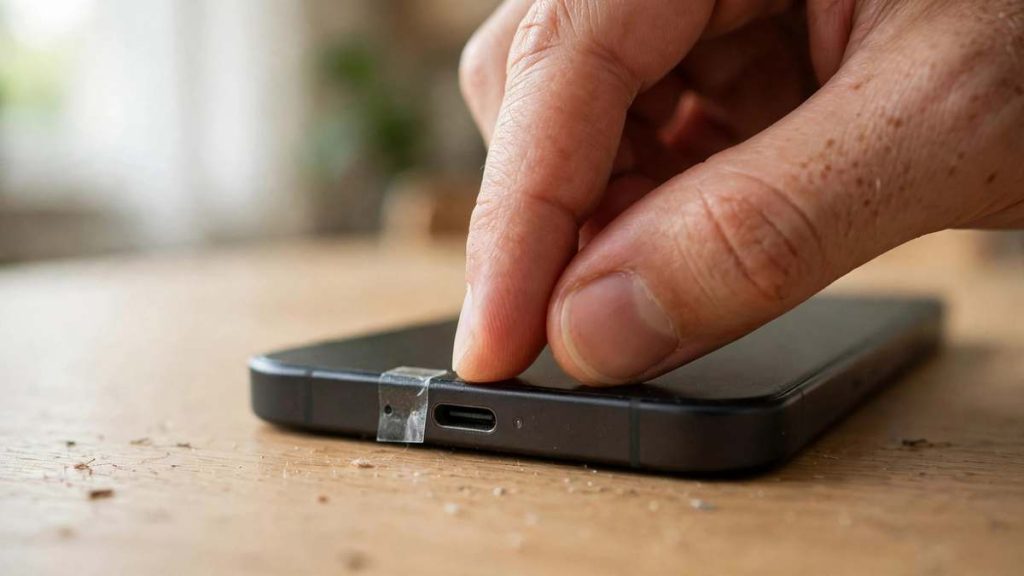
Find your phone’s microphone opening
Look at the bottom edge, near the charging port. The main microphone is usually one tiny pinhole, separate from the speaker grille. Use a bright light. If you can’t spot it, record a voice memo and lightly cover each hole with a fingertip. When the recording goes quiet, you’ve found it.
Run the microphone cleaning sound
Turn the volume up, take the case off, and point the bottom edge downward. Start with one short round. Stop right away if the sound distorts or the phone feels warm.
Keep the microphone area clear during cleaning
Don’t press your hand over the grille or lay the phone against a pillow. Hold it loosely, or rest it on a soft cloth with the bottom edge free, so the opening stays clear and anything that shakes loose can fall away.
Record your voice to check the results
Record yourself from about an arm’s length away, then play it back. Your voice should sound clear and close, not like you’re talking through a towel. Test it now, not in the middle of your next important call.
How to Test If Your Phone Microphone Is Working?
Test your microphone in a few seconds
Open an online mic test, allow microphone access, say one sentence and play it back. If the level meter moves while you talk, the microphone is picking up sound. If your voice is faint, crackly or missing, go back to cleaning.
How the online mic test works?
Your browser asks for permission, records a few seconds of audio and plays it back, so you hear roughly what a caller hears. It works on phones, laptops and headsets. Before you trust any test, check that the recording stays in your browser and isn’t uploaded.
What blocked, busy, or microphone not found means?
Blocked: your browser or phone denied microphone access. Allow it in the site settings and in your phone’s settings, then reload the page.
Busy: another app, such as a call, a video app or a voice recorder, is using the mic. Close it and try again.
Microphone not found: a headset or Bluetooth device may be set as the input. Disconnect it and retry.
Why Does Your Phone Microphone Sound Muffled?
Dust and debris around the microphone
Pockets and bags are lint factories. Over months, that lint compacts into the tiny hole. This was my problem, and it’s the most common one I see.
Phone cases covering the microphone
A case cutout that sits even a few millimeters off can partly cover the opening. Remove the case and test again before blaming the phone.
Incorrect microphone settings or permissions
If voice notes are silent in one app but fine in others, check that app’s microphone permission. Also make sure a headset isn’t selected as the input.
Water or moisture inside the microphone
Rain, steam, sweat or a quick rinse can leave your voice sounding muffled or crackly until the opening dries. Leave the phone in open air for about an hour, then retest.
How to Clean a Phone Microphone Safely?
Gently clean around the microphone opening
Use a dry, soft toothbrush, or press low-tack tape or cleaning putty on the hole and peel it away. Lint usually comes off with the tape. Never push a SIM pin, needle or toothpick into the opening, and don’t blow into it, because your breath adds moisture.
What to do if your microphone gets wet?
Keep the bottom edge facing down and let the phone dry in moving air. Skip hair dryers, heat and compressed air. Retest after an hour. If the phone was submerged, or the screen and buttons act strangely, power it off and have it serviced instead of relying on sound.
Phone microphone cleaner vs. cleaning sprays
Search results for a microphone cleaner mostly show sprays and wipes made for studio mics. A phone mic cleaner is a different thing: a sound and a manual routine for a very small opening. Never spray liquid into a phone’s microphone hole.
Is sound-based mic cleaning safe?
For short rounds at moderate volume, it’s generally safe, because it just plays audio through your speaker. Stop if the sound crackles or the phone warms up, and don’t repeat long cycles on a phone that has been in water. It can’t repair hardware, so treat it as a first step.
Phone Microphone Not Working? Try These Fixes
Apple’s support page on iPhone microphones that aren’t working follows the same order: check the case, check permissions, clean gently, then test.
Check microphone permissions and settings
On iPhone, open Settings, then Privacy & Security, then Microphone. On Android, open Settings, then Apps, choose the app, and check Permissions. Restart the phone once as well.
Remove your phone case and accessories
Take off the case, screen protector edges and any clip-on accessory near the bottom edge, then record a test clip.
Check whether the problem is with the mic or speaker
The rule is simple. If you can’t hear them, it’s the speaker or earpiece. If they can’t hear you, it’s the microphone.
Check your earpiece if call audio is unclear
If callers sound quiet or distorted on your end, the earpiece at the top of the phone may be blocked. That needs an earpiece or speaker cleaner, not a microphone fix.
When to seek professional repair?
Get it checked if the microphone stays silent after a restart, cleaning and a permission check, if the phone was submerged, or if it was dropped hard. At that point the cause is probably hardware.
Call Mic Cleaner: Improve Microphone Quality During Calls
Why your voice sounds unclear during phone calls?
A blocked main microphone is the usual reason callers hear you faintly. If the problem only appears on speakerphone, the secondary microphones on the top edge or back may be covered. Clean those openings too.
Difference between a call microphone and recording microphone
Phones often have two or three microphones. Calls mainly use the bottom one, while the top and rear microphones help cancel background noise and handle video. That’s why a voice memo can sound fine while calls sound off. Test both handset and speakerphone.
Where Is the Microphone on Your Phone?
Microphone locations on popular smartphones
| Location | Usual job |
|---|---|
| Bottom edge, near the charging port | Main microphone for calls and voice notes |
| Top edge or near the earpiece | Noise cancellation and speakerphone |
| Back, beside the camera | Video recording and noise cancellation |
On iPhone, the microphone sits behind one of the small openings on the bottom edge, so clean both sides. On most Samsung Galaxy models it’s a single small hole near the USB-C port.
How to identify the primary and secondary microphones?
Record a voice memo and lightly cover one opening at a time. If the recording goes quiet, that’s your primary microphone. If it only changes slightly or affects noise, it’s a secondary one.
Mic Cleaner vs. Speaker Cleaner: What’s the Difference?
Phone microphone cleaner vs. speaker cleaner
A speaker cleaner plays a tone to push water and dust out of the speaker grille. A microphone cleaner works from the outside: it shakes the area around the opening so debris can be wiped away. One fixes what you hear, the other what others hear.
When to use a mic cleaner sound or speaker cleaning tool?
If people can’t hear you, start with the microphone. If you can’t hear them, use the speaker cleaner. Many people search “fix mic speaker” and mean one of these two. Because both sit on the bottom edge, running both is a safe move. For your next step, learn how to fix my mic with a quick record-and-playback test.
FAQs
Does mic cleaner sound really work?
It can help with light dust and a few droplets near the opening. It won’t fix a damaged microphone or deep lint. Pair it with gentle wiping and always test afterward.
Can sound remove dust from a phone microphone?
Sound vibrates the area around the opening, which can loosen surface dust. Packed lint needs tape or a soft brush.
Is an online microphone cleaner safe to use?
Yes, at moderate volume and in short rounds. Stop if the audio distorts or the phone gets warm.
Can I use a mic cleaner after water damage?
For a splash, let the phone dry first, then try a short round and retest. For submersion, power it off and get it serviced.
Does mic cleaner work for iPhone and Android?
Yes. It runs in the browser, so it works on both. Only the microphone positions differ by model.
Can I use a microphone cleaner for phone calls?
Yes. Clean the bottom opening and the secondary ones, then test in handset and speakerphone positions.
Why does my microphone still sound muffled after cleaning?
Check the case, app permissions and the input device first. If it persists after a restart, the microphone may be damaged.
Is a microphone cleaning app better than an online tool?
Not necessarily. Both play the same kind of tone. An online tool needs no install, but any tool you use should be clear about microphone permission and privacy.
100% Free Mic Cleaner Online - Cleaner Cleans Dust & Water From Phone
Sound muffled on calls? This free mic cleaner shakes dust and water loose from your phone microphone then test your mic in 3 seconds. No app needed.
4.9