100% Free Speaker Cleaner Online
Smart Speaker Cleaning
A quick guided check builds the right cleaning cycle for your phone, then plays it for you.
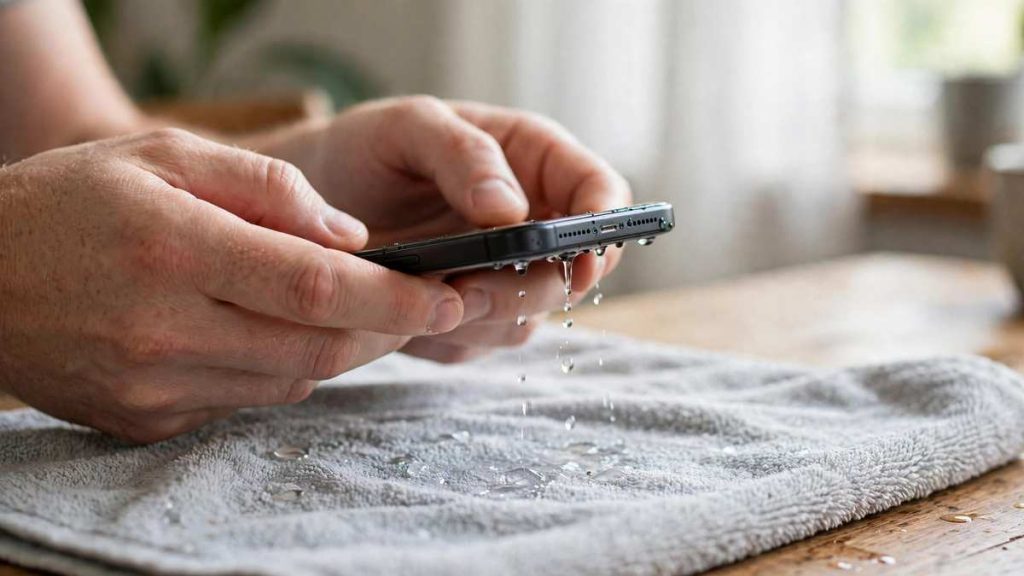
Tip: set your volume high, remove the phone case and hold the phone speaker-side down so gravity helps the water and dust fall out.
Use Speaker Cleaner to Remove Water and Dust from Phone Speakers Online
Not long ago my phone started sounding like it was talking from the bottom of a bucket. Calls were quiet, music was flat, and the volume bar sat at maximum doing nothing. A speaker cleaner fixed it in about a minute. It plays a low-frequency tone with vibration so trapped water and loose dust move out of the grille. This page runs the whole thing in your browser. It is free, needs no download, and works on iPhone, Android, tablets and laptops.
Clean Your Speaker Online
Use the tool below the way I use it on my own phone. Take the case off, wipe the grille, and give yourself one quiet minute. The tone is loud on purpose, so keep the phone away from your ear.
Check How Severe Your Speaker Problem Is?
Play a song first. Mild means the sound is a little dull. Medium means low volume or crackling. Severe means the speaker is almost silent, usually right after a soaking. In a severe case, power the phone off, dry the outside, and let it rest a few minutes before you start.
Choose the Right Speaker Cleaning Mode
Pick Water Eject if the phone was wet in the last few hours: rain, a pool splash, a sink, a sweaty workout. Pick Dust Removal if the phone is dry but sounds dull, which is common after months in a pocket or bag.
Start the Speaker Cleaning Sound
Set the media volume to maximum, switch Bluetooth off, hold the phone with the grille facing the floor, and press Start. Let one 30 to 60 second cycle finish. Then play a song and compare. Most of the time the difference is obvious within the first cycle.
How to Use the Speaker Cleaner Sound?
The cleaning tone works best when you follow four steps: raise the volume, point the grille down, play the tone with vibration, then test and repeat once if needed. The routine takes about two minutes, and I have never needed more than three rounds.
Turn Your Device Volume Up
Put the media volume at maximum, not the ringer volume. Turn Bluetooth off first. If earbuds or a car stereo are connected, the tone goes there and your phone speaker never moves.
Point Your Speaker Down
Hold the phone so the speaker grille faces the floor. Gravity does a lot of the work here. Water drains toward the opening, and loosened dust falls out instead of settling back in. On most phones the main fix my speaker sits on the bottom edge, so hold the phone upright with the bottom edge pointing down.
Play the Cleaning Tone and Vibration
Press Start and keep the phone steady. The tone moves the speaker diaphragm while the vibration shakes the phone body. Together they clear more than a single beep does. A buzzing or fluttering sound while water leaves is normal, so let the cycle finish.
Test Your Speaker and Repeat if Needed
Play a song or ring your phone from another number. If the sound is clearer, you are done. If it is still muffled, run one more cycle. Three rounds is my limit. After that, the cause is probably not loose water or dust.
What Is a Speaker Cleaner and How Does It Work?
A speaker cleaner is a tool that plays a specific tone and vibration pattern through your device speaker. The diaphragm moves quickly, pushes air through the grille, and helps force out water droplets and shake loose fine dust. It does not repair a torn cone or reverse corrosion. It only moves what is blocking the sound.
How Sound Waves Help Remove Water and Dust?
A phone speaker is a small loudspeaker. A thin diaphragm and a voice coil move back and forth, and a metal or plastic grille with tiny holes protects them. Water sticks in those holes through surface tension, which is why even a water-resistant phone can sound dead after a splash. A low-frequency sweep, usually in the 165 to 230 Hz range, makes the diaphragm push air outward in rapid pulses. That air movement breaks the water film and pushes droplets toward the opening. Dust and lint behave differently. They sit in the mesh, so a higher pulse plus vibration loosens them until gravity or a soft brush can finish the job.
Speaker Cleaner Sound and Tone Generator
Some pages also include a tone generator that plays a single frequency, such as 220 Hz or 440 Hz, in a sine, square or triangle waveform. I use it as a quick test. If one frequency sounds rattly or very quiet, something is still blocking the grille. For actual cleaning, the automatic cycle is safer, because it keeps the sweep in a range your phone is built to handle.
Sound and Vibration Cleaning Technology
Sound moves the air. Vibration moves the phone. Both matter for compacted lint. Android phones running Chrome usually allow web pages to trigger vibration. Many iPhone browsers do not, so on an iPhone the sound does most of the work. That is one reason I suggest a second cycle on iPhone when the first one feels weak.
Two Speaker Cleaning Modes
Water and dust need different handling, so the tool offers two modes. Using the wrong one wastes a minute but does no harm.
| Water Eject | Dust Removal | |
|---|---|---|
| Best for | Rain, splashes, swimming, sweat | Dull sound, lint, pocket dust |
| Sound type | Low-frequency sweep | Higher pulse sequence |
| Typical time | 30 to 60 seconds | 30 to 60 seconds |
| Repeat | Up to 3 rounds | Up to 3 rounds |
Water Ejection Sound
Use this mode when the phone got wet and the sound turned muffled, low or distorted. The low sweep moves the diaphragm hard enough to push water out through the grille. Wipe the phone dry first, keep the grille facing down, and do not charge the phone until it is fully dry. Apple Watch has a similar feature called Water Lock, which ejects water with sound after swimming, so the idea behind this mode is not new.
Dust Removal Sound
Use this mode when the phone is dry but the audio feels dull or crackly. The higher pulse and vibration shake fine dust and lint loose from the speaker mesh. After the cycle, wipe the grille with a soft dry cloth. If you can still see lint, use a soft brush gently. Never use a pin or a needle.
Phone Speaker Cleaner for Different Devices
A phone speaker cleaner sound works on any device that can play audio in a browser, because it uses the normal speaker output. Position and expectations change from device to device, so here is what I have noticed.
iPhone and iPad Speaker Cleaner
On an iPhone the main speaker grille sits on the bottom edge next to the charging port, and the earpiece sits at the top. Most iPhones carry an IP68 rating, which covers dust and short immersion in water, but the rating does not stop a damp, muffled speaker. Hold the iPhone upright with the bottom edge down. Apple support advises against heat sources and compressed air for drying, so skip both. On iPad, the speakers sit on the sides or the bottom depending on the model, so check where the grille is before you point it down.
Samsung and Android Speaker Cleaner
Samsung Galaxy phones and most Android phones put the main speaker on the bottom edge. Some models also use the earpiece as a second speaker for stereo sound, so both openings can collect dust. Android phones on Chrome can usually add vibration to the tone, which makes the cycle a bit stronger. Remove the case first, because many Android cases cover the speaker slot.
Google Pixel, Oppo, Vivo, and OnePlus Speaker Cleaner
These phones often have a slim grille with small holes, so fine dust collects easily. On a Google Pixel, the bottom speaker clogs first. On Oppo, Vivo and OnePlus, start with Dust Removal if the phone has not been wet. One mobile speaker cleaner cycle followed by a soft brush usually clears them.
Xiaomi, Motorola, Realme, and Other Android Phones
Xiaomi, Motorola, Realme and similar brands use the same basic speaker design, so the same routine works. Face the grille down, run one cycle, test, and repeat once. On a budget model with a thin grille, start with 30 seconds.
AirPods and Ear Speaker Cleaner
Be careful here. Do not play a loud tone next to your ear or with earbuds inside it. For the earpiece on your phone, run the cycle with the phone held away from your face. For AirPods and other earbuds, a dry soft brush works better than a loud tone, and the mesh is easy to damage with anything sharp.
Laptop, MacBook, and Tablet Speaker Cleaner
Laptop and tablet speakers sit near the keyboard, along the sides, or on the bottom. On a MacBook, the speaker grilles run beside the keyboard. Use moderate volume, tilt the device so the grille faces downward, and keep the cycle short. Larger speakers move more air, so dust and moisture usually clear in the first round.
What Can a Speaker Cleaner Sound Help With?
The cleaning tone can help with three things: trapped water, loose dust and a general muffled sound. It cannot repair broken hardware, a burnt voice coil or a speaker corroded by saltwater.
Removing Trapped Water from Speakers
After rain, a pool or a kitchen splash, the water sits behind the grille and blocks the diaphragm. The low sweep pushes it out. In my experience, the sound comes back clearly within one or two cycles when the water is only in the grille. If the phone was fully submerged, the problem can be deeper.
Clearing Loose Dust and Debris
Pocket lint, sand, makeup and skin oil build a thin layer on the mesh. The pulse and vibration loosen that layer so it falls out or wipes away.
Improving Muffled or Low Speaker Sound
If the speaker sounds dull and nothing is visibly blocking it, a cleaning cycle is a cheap first test. If nothing changes after three rounds, try headphones to rule out software, then see a repair shop.
Signs Your Phone Speaker Needs Cleaning
Your ears will tell you first.
Muffled or Distorted Audio
Voices sound far away, or music loses its sharp edges. The sound is fine on headphones but poor on the speaker. That difference points to the speaker opening, not the phone software.
Low Volume Despite Maximum Settings
Maximum volume feels like half volume. The people on your calls ask you to speak up or to repeat yourself, or you cannot hear a ringtone in a quiet room.
Crackling or Unclear Speaker Sound
Crackling, buzzing or a rattle at higher volume often means debris or leftover moisture. Visible lint on the grille is another clear sign.
Why Do Phone Speakers Get Clogged?
A phone speaker is a small opening that faces the outside world all day, so it collects whatever is around it.
Dust and Dirt Accumulation
Pockets, bags and desks add a thin layer of dust and lint every week. It builds slowly, so you rarely notice until the sound is clearly worse.
Water and Moisture Exposure
Rain, sweat, steam from a bathroom and a quick splash all leave water behind. Even a water-resistant phone can hold droplets in the grille.
Everyday Use and Environmental Debris
Sand from the beach, makeup, skin oil and cooking grease mix with dust and form a sticky film. That film is harder to shift, which is why monthly cleaning beats waiting for a problem.
Is Using an Online Speaker Cleaner Safe?
Yes, when you use it correctly. An online tool like this plays tones in the normal range of a phone speaker, so a short cycle at maximum volume stays inside what the hardware is designed for.
Understanding Safe Cleaning Frequencies
The 165 to 230 Hz range sits in the low end of normal music playback. It is enough to move the diaphragm without pushing the speaker past its limits. Keep each cycle to one or two minutes.
Can Speaker Cleaning Sounds Damage Your Phone?
A short cycle in the normal range will not damage a healthy speaker. A speaker that was already damaged, torn or corroded can sound worse under any loud playback. Stop the sound if you hear heavy distortion, a harsh scratching, or if the phone feels warm.
What Not to Do When Cleaning Phone Speakers
Do not use a hair dryer or direct heat. Do not put the phone in rice, because it does not work well and can leave starch and dust behind. Do not poke the grille with pins or needles. Do not use compressed air at close range. Do not charge the phone while it is wet.
Safety Tips for Better Speaker Maintenance
Keep the phone away from your ear during every cycle. Turn Bluetooth off so the tone plays from the phone. Clean the grille with a soft dry brush once a month. Take the phone out of a tight case now and then, and wipe sand off before it settles in. If the speaker is still weak after a few tries, the cause is probably physical, and a repair shop is the right next step.
Why Use Our Online Speaker Cleaner?
My routine is built around a tool I can open in seconds, with nothing to install and nothing to sign up for.
No App Installation Required
It runs in Chrome, Safari, Edge and Firefox. Nothing to download, no account, and the tone is generated on your device, so nothing is uploaded.
Works on iPhone, Android, and Other Devices
Any device that can play audio in a browser can run it, including iPhone, Samsung Galaxy, Google Pixel, tablets and laptops.
Simple Sound-Based Cleaning Process
Pick a mode, raise the volume, face the grille down and press Start. No tools, no tapping, no opening the phone.
Water and Dust Cleaning Options
Water Eject and Dust Removal live on the same page, so you can switch modes without leaving the tool.
Frequently Asked Questions About Speaker Cleaner
What is a speaker cleaner?
It is a browser tool that plays a low-frequency tone with vibration through your speaker. The movement helps push out trapped water and loosen dust from the grille. It restores muffled sound but does not repair physical damage.
Does speaker cleaner sound really work?
Yes, for water and dust that sit in the speaker grille. The tone moves the diaphragm and shakes debris loose. It cannot fix a broken speaker or a phone with internal water damage. If nothing improves after three cycles, the cause is likely physical.
How do I remove water from my phone speaker?
Wipe the phone dry, turn the media volume to maximum, and hold the grille facing down. Run the Water Eject mode for 30 to 60 seconds and test the sound. Repeat up to three times. Do not use heat, rice or a charger while the phone is wet.
Can sound remove dust from a phone speaker?
Yes. A higher pulse with vibration loosens dust and lint from the speaker mesh. Afterwards, wipe the grille with a soft dry cloth or brush. It works best on loose dust, not thick, sticky buildup.
How long should I play a speaker cleaning sound?
Play one cycle of 30 to 60 seconds, then test. If the sound is still dull, run one more. Avoid playing a cleaning tone for ten minutes or more, because it adds no benefit.
Is online speaker cleaner safe for iPhone and Android?
Yes. The tones stay in the normal range of phone speakers, so short cycles are safe for iPhone and Android. Keep the phone away from your ear, stop if you hear distortion, and do not run it on a speaker you already know is damaged.
Can I use a speaker cleaner without downloading an app?
Yes. This tool runs in your browser on Chrome, Safari, Edge or Firefox. You do not need an app, an account or any permission. The tone is created on your device.
How often should I clean my phone speaker?
Once a month is a sensible routine for dust. Run a Water Eject cycle straight after any splash or swim.
What should I do if my speaker is still muffled after cleaning?
Wipe the grille with a soft dry brush, restart the phone and test the sound on headphones. If headphones sound fine and the speaker still sounds dull after three cycles, the speaker may be damaged. A repair shop can check it.
100% Free Speaker Cleaner | Remove Water With Smart Cleaning Sound
Use this free speaker cleaner to eject water and remove dust from your phone speaker. Answer 5 quick questions and play a smart cleaning sound tuned to your device.
4.9